
Go live on a testnet · Lesson 12 of 14
Deploy to Sepolia
About 10 minutes · On a computer
The Remix VM disappears when you refresh. Now you'll put the same contract on Sepolia, a public test network, where anyone in the world can see it. You'll pay a tiny fee in test ETH, which is free.
You need: MetaMask set to Sepolia with some SepoliaETH (from the wallet lessons), and Remix with MyFirstContract.sol compiled.
Connect Remix to MetaMask
Click Deploy in the left bar and open the Environment dropdown. With MetaMask installed, it lists an option for your browser wallet (Remix's docs call it Browser Extension). Pick it. MetaMask asks to connect: check the site is
app.remix.live, then connect.Screenshot coming soon: Remix Environment dropdown set to the browser wallet optionCheck the network
Remix shows your MetaMask account and its balance. Make sure MetaMask is on Sepolia and the balance isn't zero.
Deploy
Click the big Deploy button. This time MetaMask pops up with a transaction: it shows a small network fee in SepoliaETH. That's expected, it's test ETH. Confirm it.
Screenshot coming soon: MetaMask confirming the contract deployment on SepoliaWait a few seconds
When the transaction is confirmed, your contract appears under Deployed Contracts, with a real address on Sepolia. Try Call on
messageand Transact onsetMessageagain. Changing the message now asks MetaMask for a small test fee each time.Copy your transaction hash
You'll need it for your badge. In the Deploy panel, open the Transaction History tab, then Transaction List. Find the
MyFirstContractentry marked deploy and click the copy icon next to itstx:code. That copies the full transaction hash, a long code starting with0x.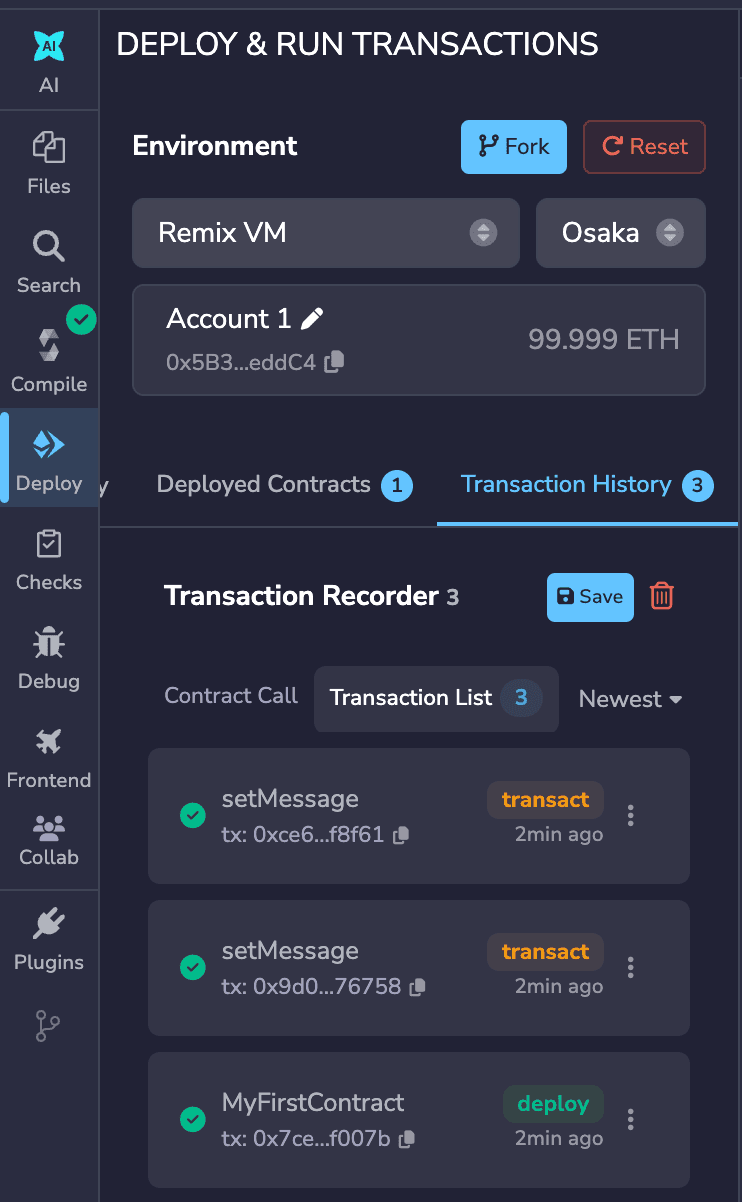
Your deploy entry is the one marked deploy. The copy icon copies the full hash. Prefer MetaMask? Open Activity, click the contract deployment and view it on the block explorer. Sepolia Etherscan shows the same Transaction Hash.
Your contract is now live on a public network. Next, prove it.
Before you move on
Tick these off as you go.